
If you run a hotel, guesthouse, cottages, apartments, or agritourism business, you know that invoicing can eat up a lot of time – especially during the high season. That’s why at Booqly we’ve prepared a simple integration with KSeF (the National e-Invoicing System), which allows you to: issue invoices directly in Booqly and then safely send them to KSeF (with the option to work in offline mode as well, in case of availability issues).
Below you’ll find a practical step-by-step guide for accommodation owners across Poland: from generating certificates in KSeF to activating the connection in the Booqly panel.
Who is this for? For accommodation facilities that want to manage everything in one place: reservations, availability, guest communication, and VAT invoices (with KSeF).
Quick overview: what you’ll need
- Access to the KSeF Taxpayer Application 2.0 (taxpayer or authorized user account).
- Generation of 2 certificates in KSeF:
- Authorization certificate (for authentication and online connections).
- Issuer verification certificate (offline mode / verification link signature).
- Saved passwords for the private keys (they cannot be “read” from the file – you must know them).
- Uploading the files in Booqly under: Finance > KSeF Integration.
KSeF in accommodation businesses: why it’s worth setting this up early
In the accommodation industry, invoices can appear at different stages: at check-in, at check-out, after the stay (for companies), and sometimes also for additional services (e.g. meals, conference rooms, events). Integration with KSeF in invoicing software for hotels and guesthouses brings real benefits:
- One place to work – you create the invoice in Booqly and send it to KSeF without retyping data.
- Fewer errors – consistent contractor data, tax IDs, addresses, and VAT rates.
- Secure issuer verification – important for offline modes (e.g. offline24).
- Scalability – if you manage multiple properties or many rooms, automation makes even more sense.
Step 1: authorization certificate in KSeF (authentication in the KSeF system)
- Log in to the KSeF Taxpayer Application: ap.ksef.mf.gov.pl
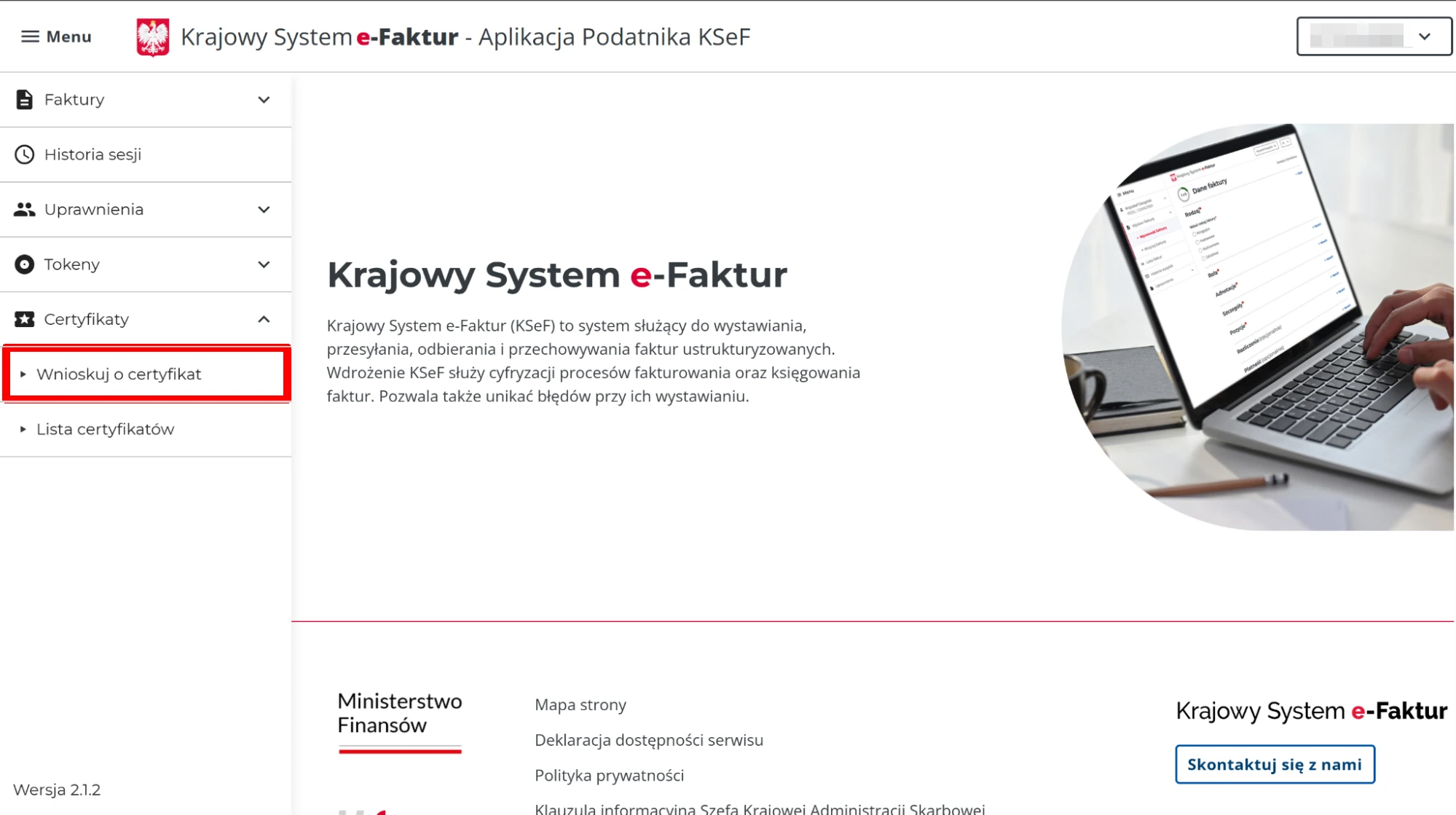
- Go to: Certificates > Apply for a certificate.
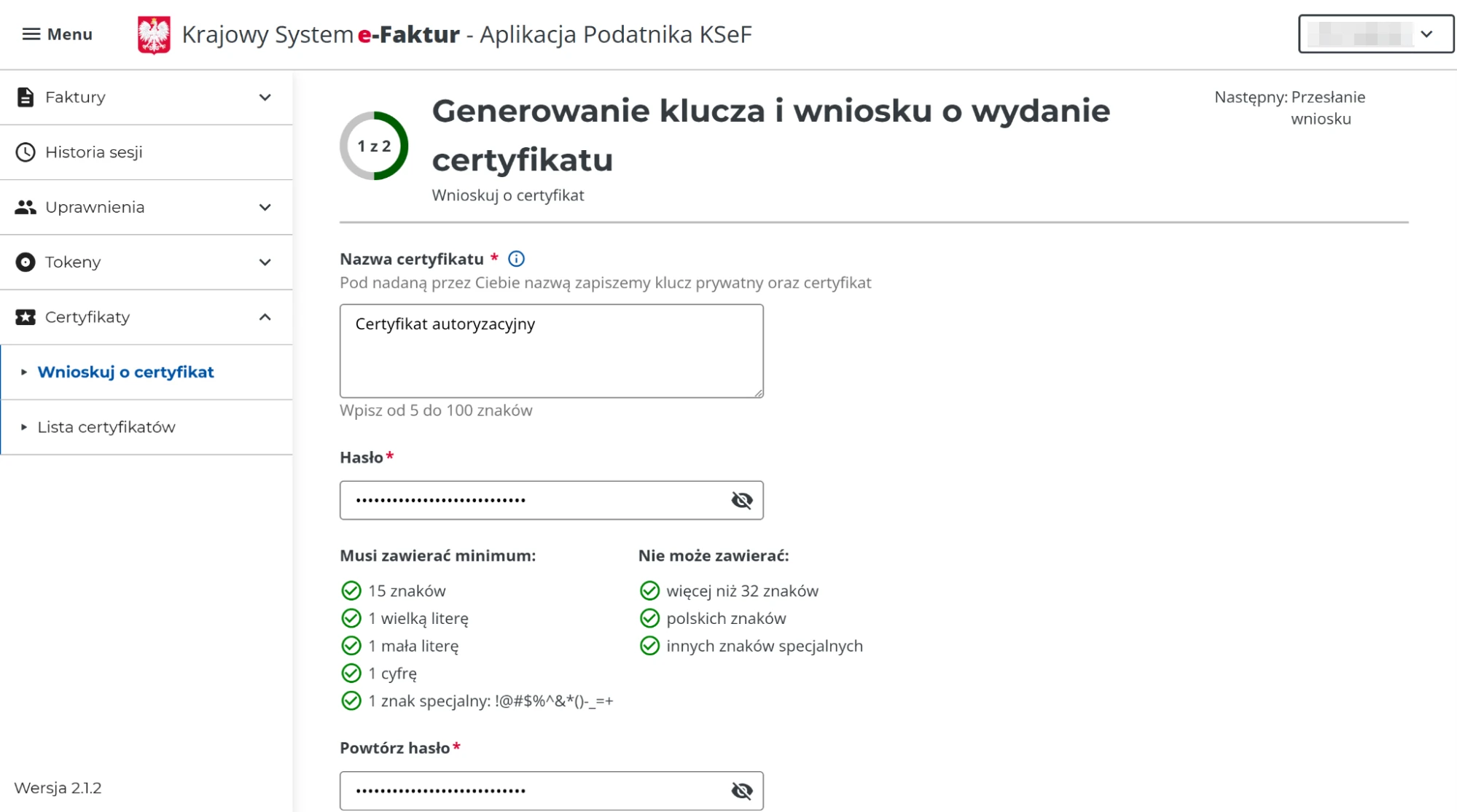
- Give the certificate a name and set a password.
- Save the password (preferably in a password manager) – you’ll need it when importing into Booqly.
- The password secures the private key downloaded to your computer.
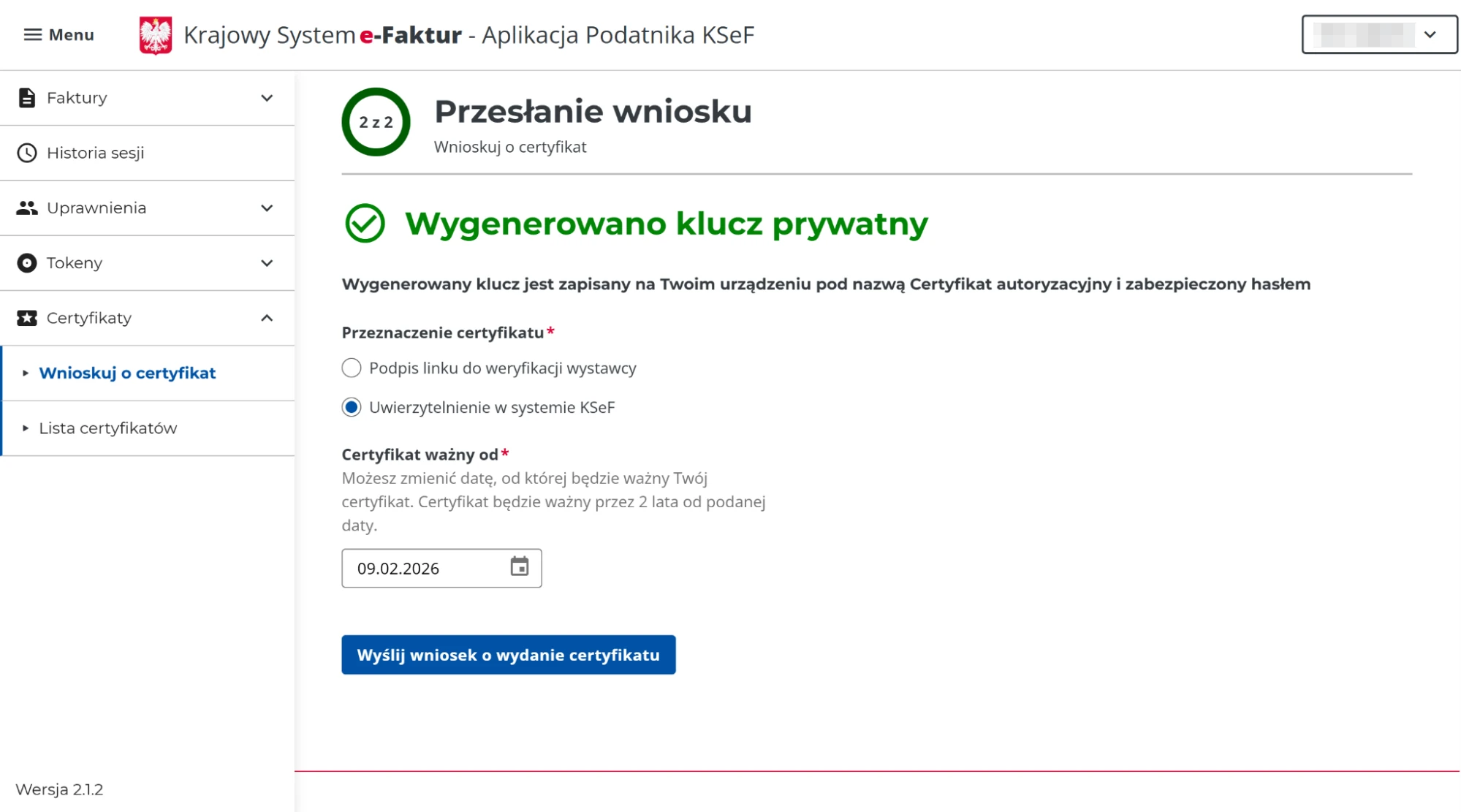
- After confirmation, the system will download the private key to your computer.
- Select: “Authentication in the KSeF system” and click
“Submit certificate issuance request”.
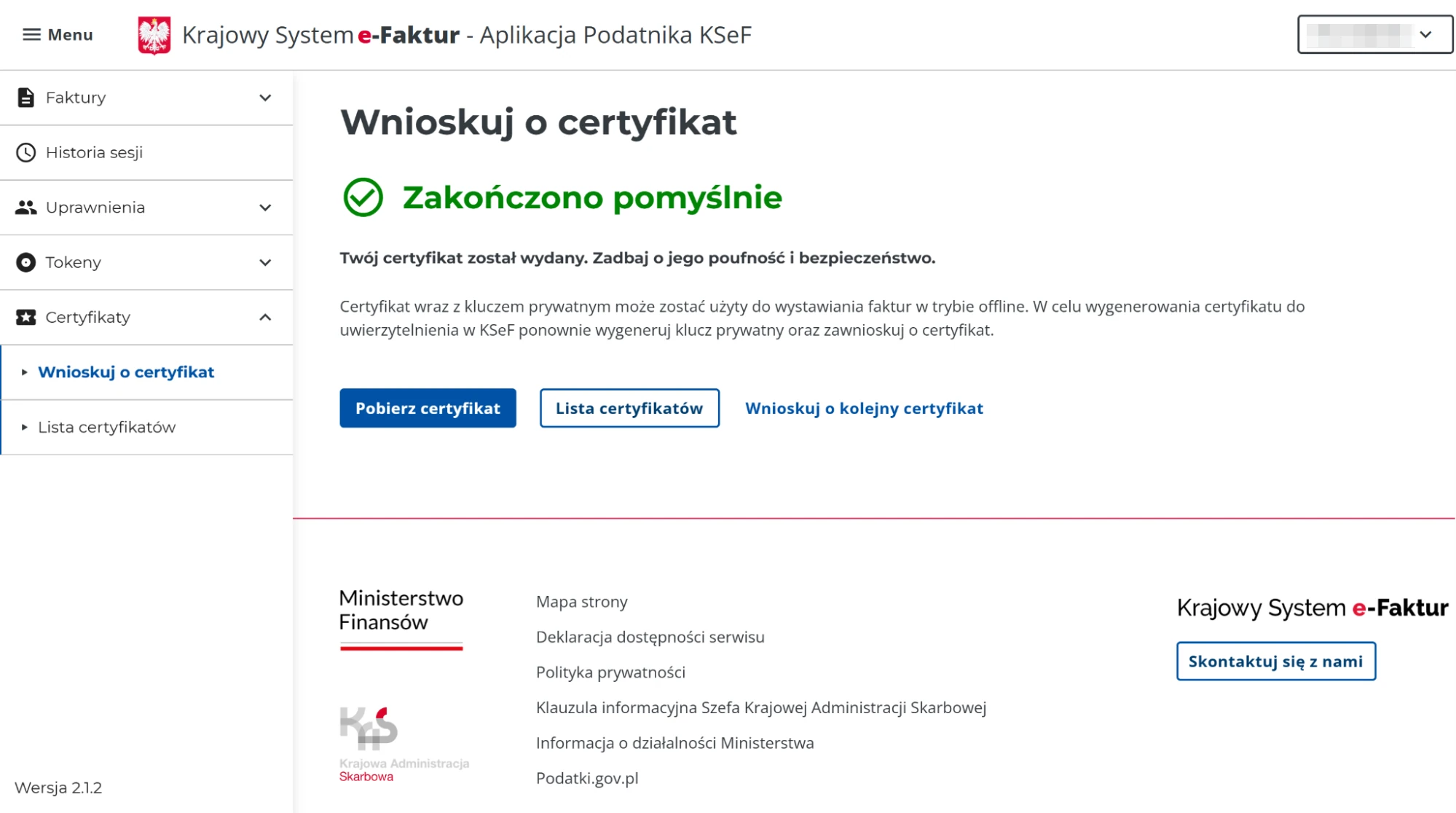
- Refresh the page – after successful issuance, download the certificate and save it on your computer.
Tip for hotels/guesthouses: name the certificate so that after a year it’s clear what it’s used for (e.g. “Booqly-Authorization-Reception” or “KSeF-Online-Invoicing”).
Step 2: issuer verification certificate in KSeF (offline mode / link signature)
This certificate is crucial if you want to be able to issue invoices also in offline scenarios (e.g. as part of offline24), i.e. when there are availability issues with KSeF or the internet connection.
- Go back to: Certificates → Apply for a certificate.
- Name the certificate and set a password (save it as well).
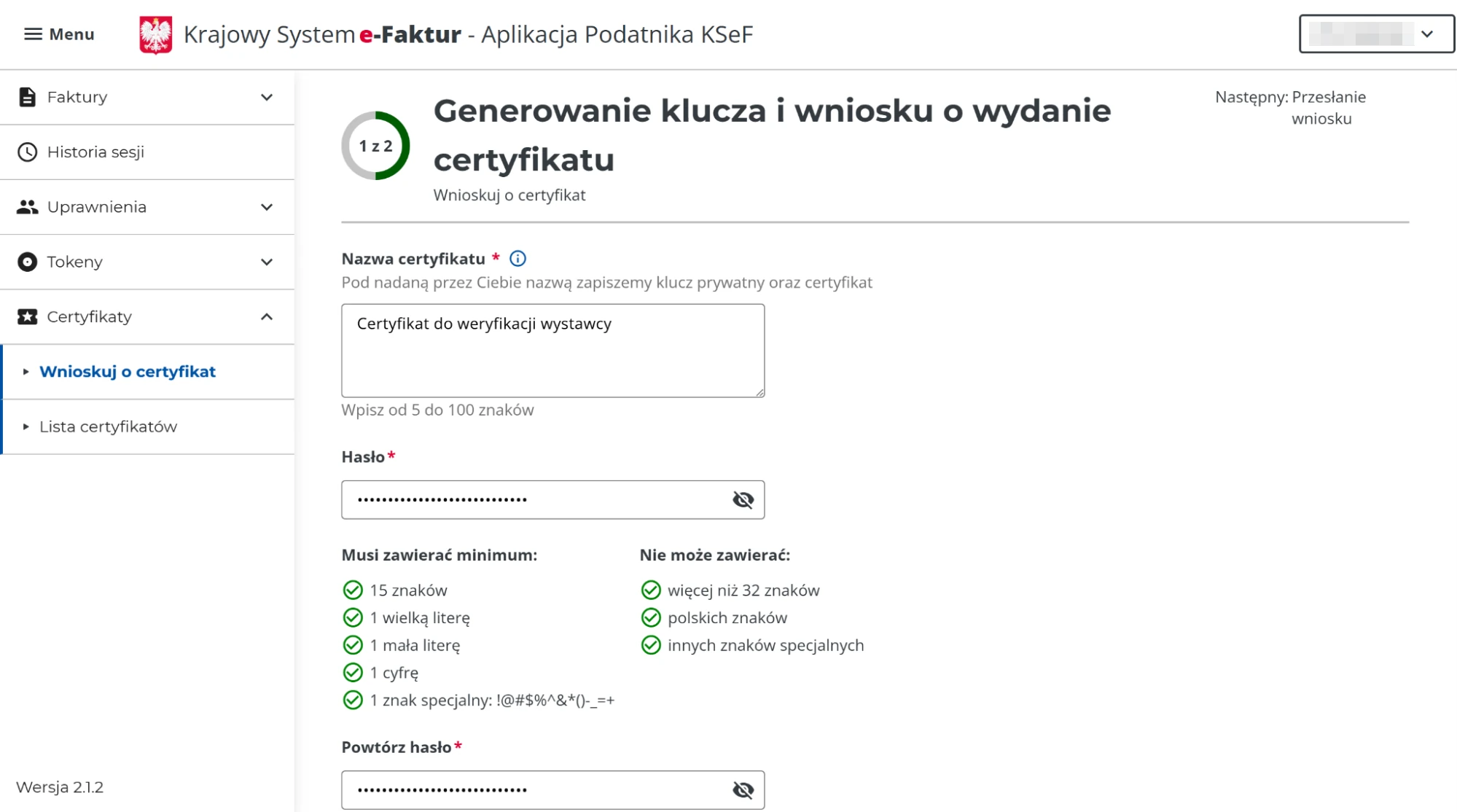
- After confirmation, the private key will be downloaded to your computer.
- Select: “Issuer verification link signature” and click
“Submit certificate issuance request”.
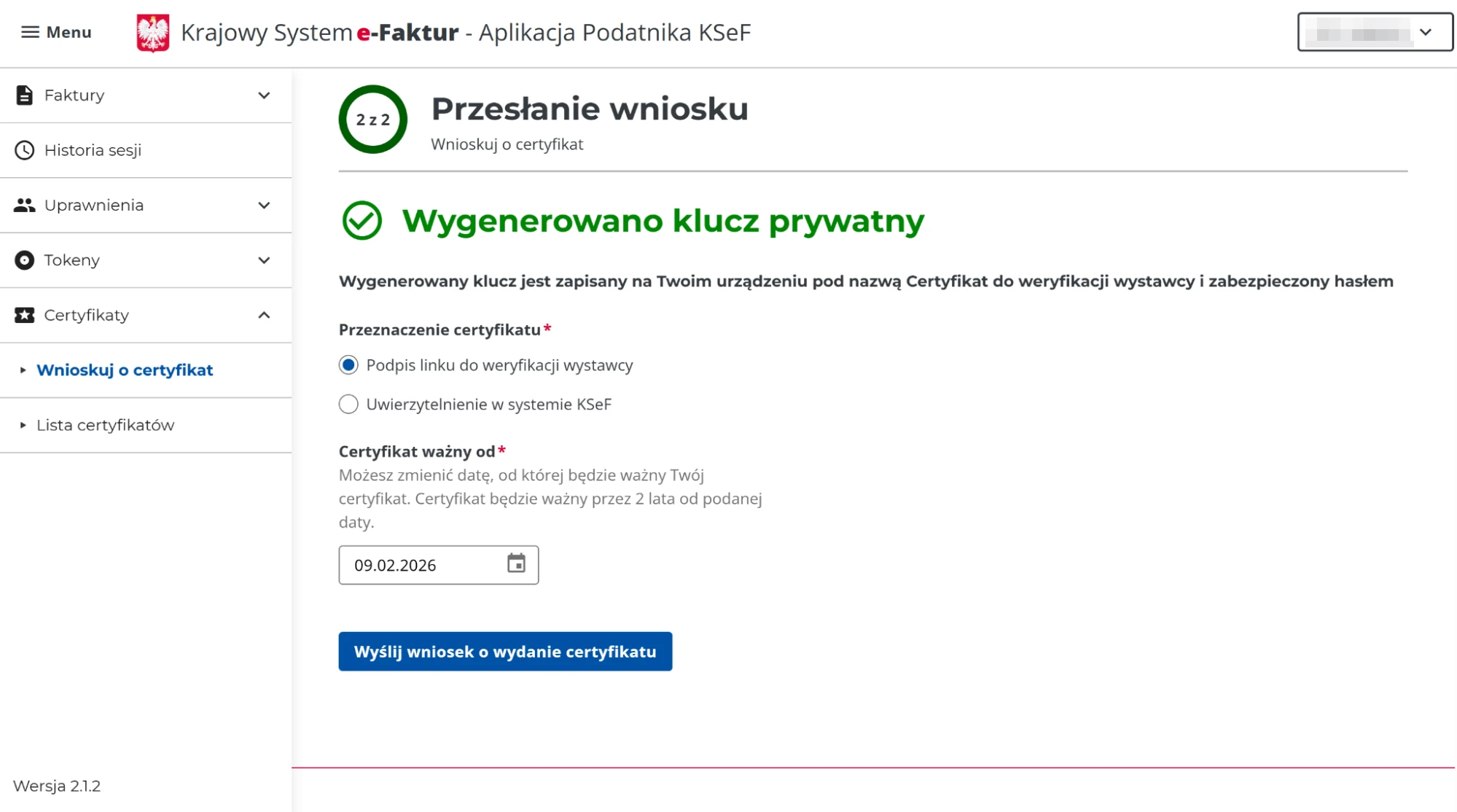
- Refresh the page – after successful issuance, download the certificate and save it on your computer.
Why is this important in accommodation? Because outages don’t choose a convenient moment – and invoices are often needed “right now” (a company is leaving in the morning, a guest needs the document immediately). The offline certificate supports continuity of invoicing when KSeF or the internet isn’t working perfectly.
Step 3: adding KSeF certificates in Booqly (Finance → KSeF Integration)
- Log in to the Booqly panel: booqly.pl/app/login
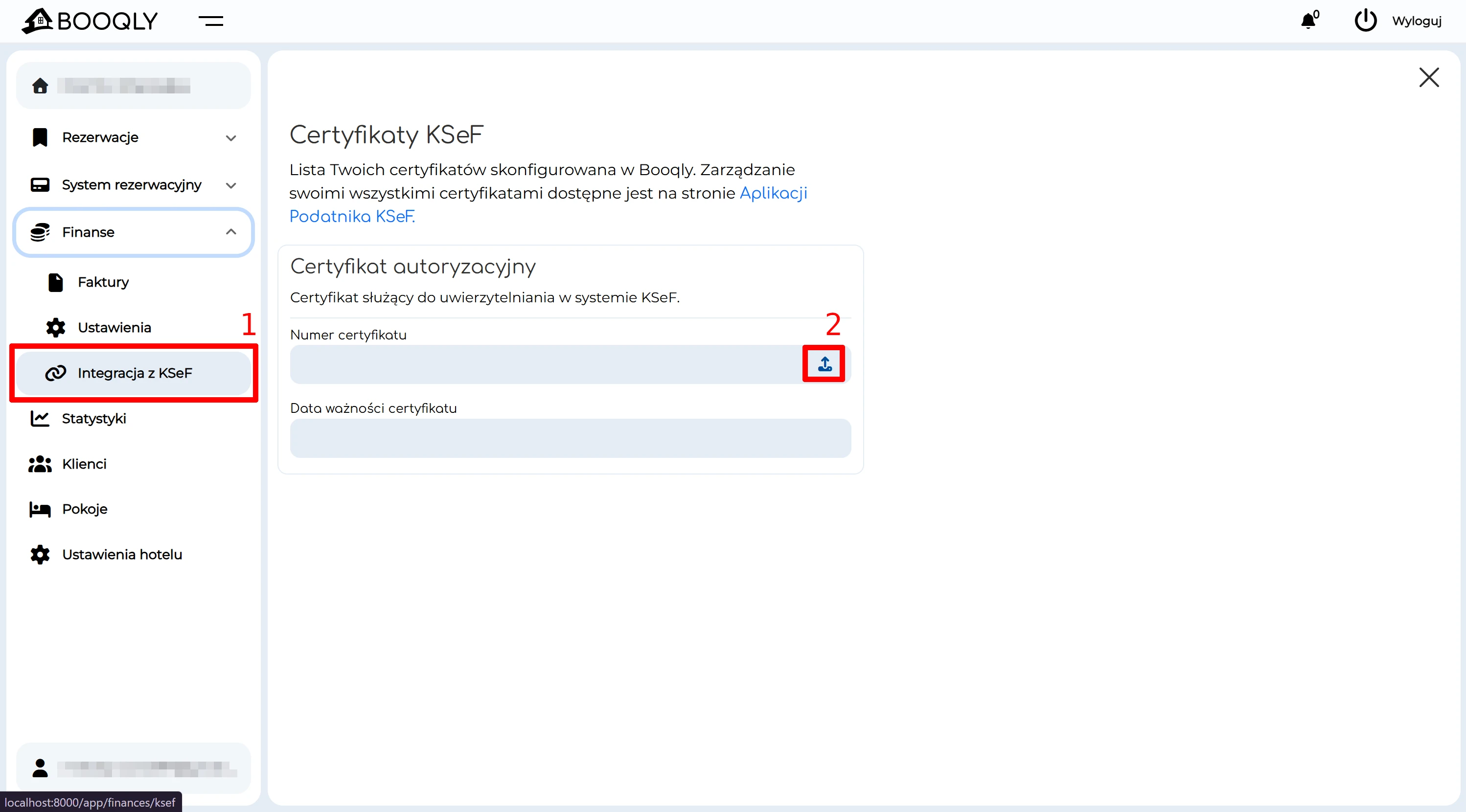
- From the side menu, go to: Finance > KSeF Integration.
- Click the upload icon in the section: KSeF Certificates.
- Upload the authorization certificate and the private key
generated in KSeF, then enter the password you set when generating the certificate.
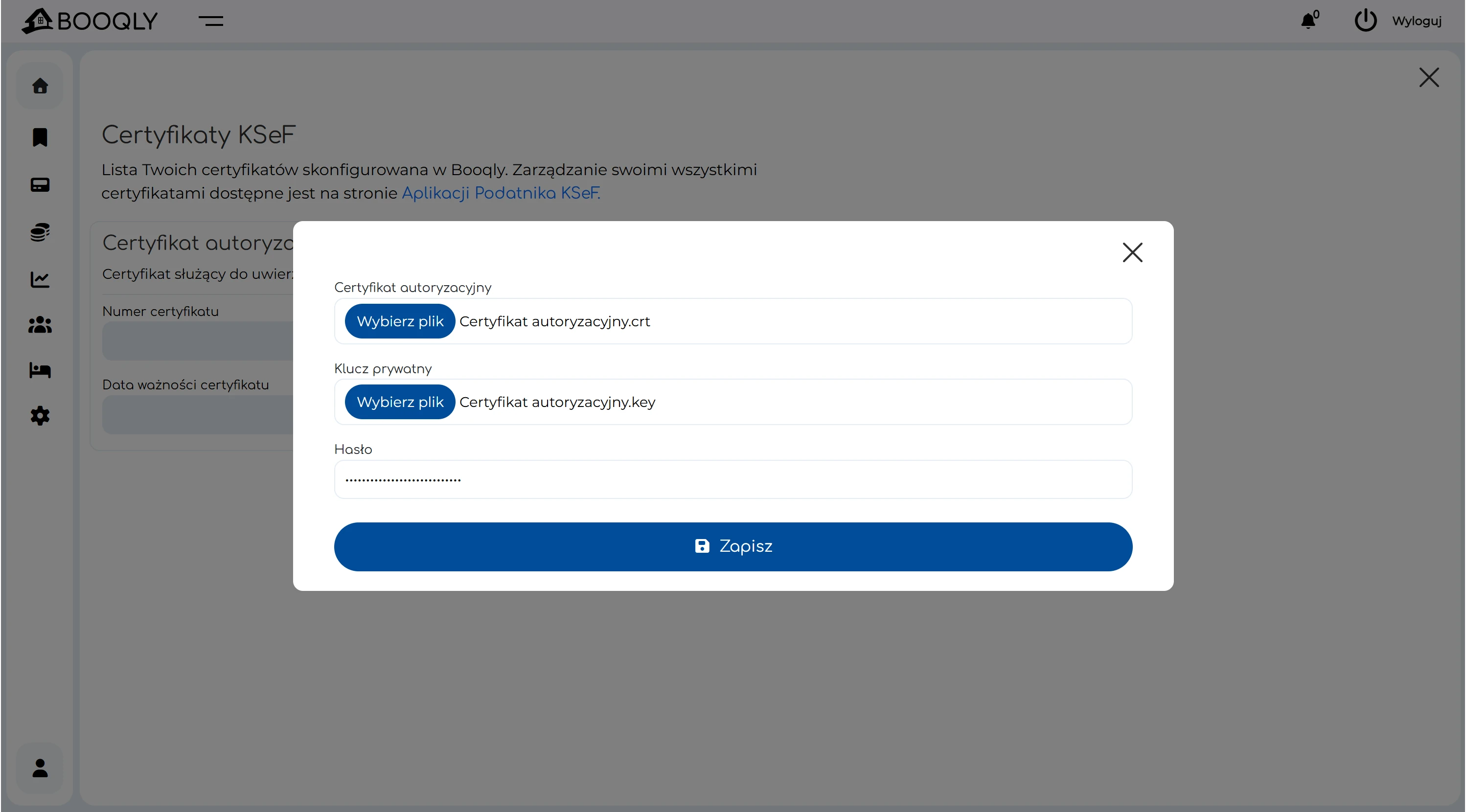
- Click “Save”.
- After successful authorization, you’ll see a confirmation message, and the certificate data will appear in the section:
“Authorization certificate”.
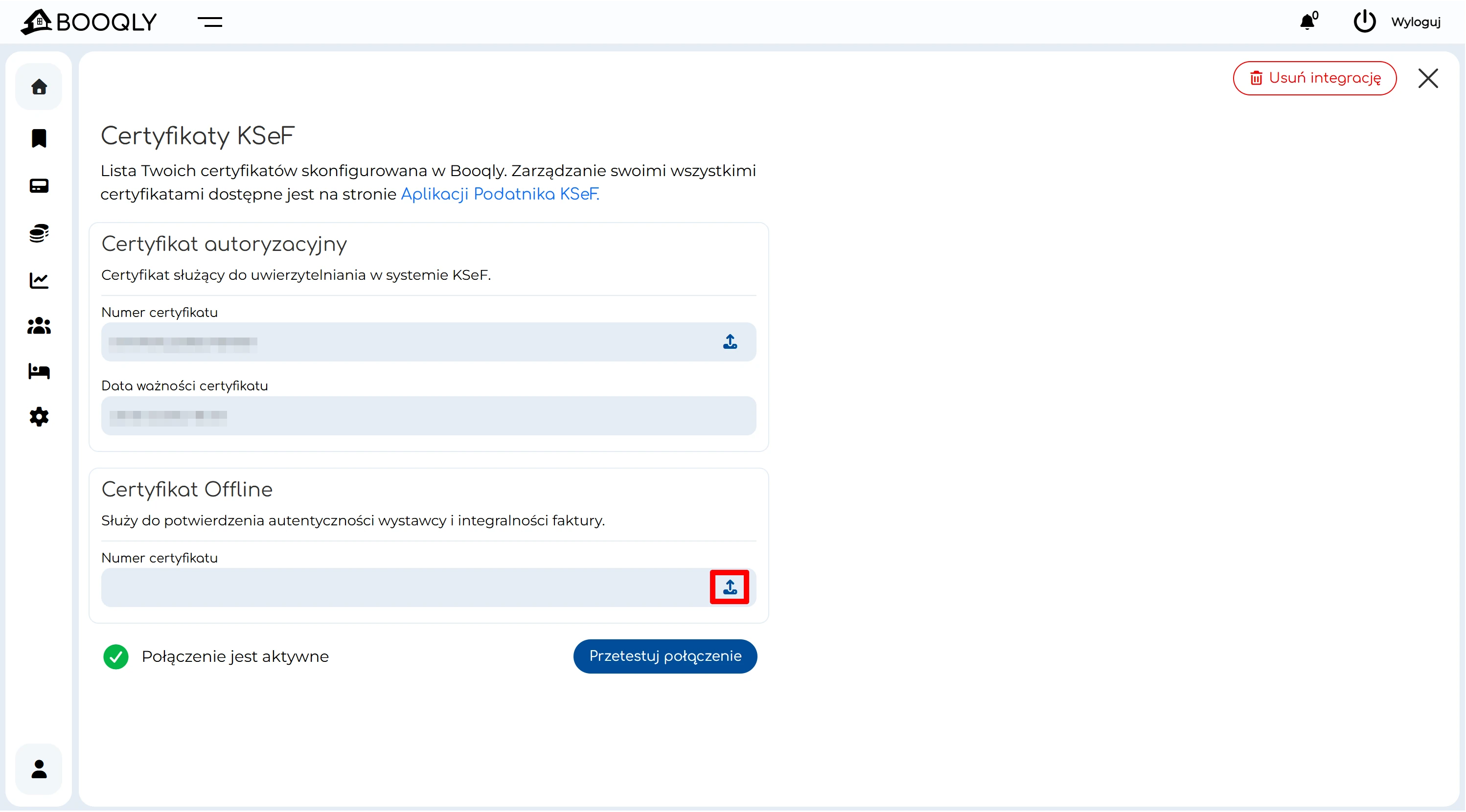
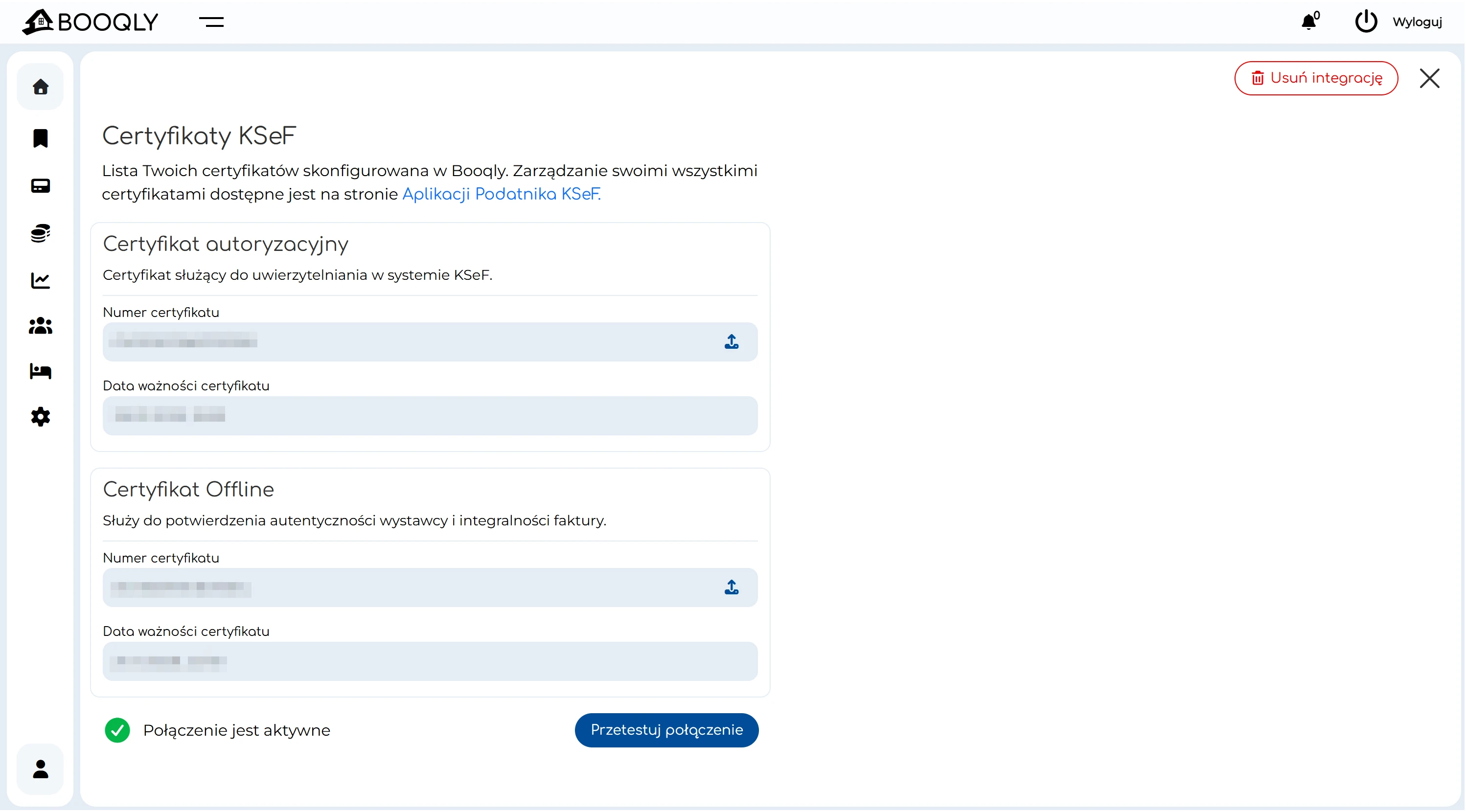
- Repeat steps 3–6 in the “Offline Certificate” section to add the issuer verification certificate (supporting offline invoicing, e.g. offline24).
- After successful integration, you’ll see a green icon at the bottom:
“Connection is active”. You can also manually check the connection by clicking
“Test connection”.
That’s it – from now on you can issue invoices in Booqly and safely send them to KSeF. If you run an accommodation facility, this means less manual work and confidence that your documents are consistent.
Most common issues and quick solutions (KSeF + Booqly)
1) “Incorrect private key password”
- Make sure you’re entering the password set when generating the certificate in KSeF (not your login password).
- Check that you haven’t pasted any trailing spaces.
2) “I uploaded the certificate, but the connection isn’t active”
- Click “Test connection” in Booqly.
- Make sure you uploaded the correct pair of files: the certificate and its corresponding private key.
- If you generated multiple certificates, it’s easy to mix them up – check the names and dates.
3) “Do I need an offline certificate?”
It’s not always strictly required for the online connection itself, but in practice we strongly recommend it for accommodation businesses. It provides greater resilience in the invoicing process (e.g. when KSeF or the internet isn’t working perfectly).
4) “On which computer should I store the certificates?”
- Ideally on the computer of the person responsible for finance/reception, and in a secure backup (e.g. encrypted drive).
- Don’t send certificates “loosely” via email without proper security.
Why it’s worth invoicing in Booqly (especially for accommodation)
Booqly is a platform built with small and medium-sized accommodation businesses in Poland in mind: guesthouses, cottages, apartments, agritourism, hotels. We combine reservation management with finances – and KSeF integration is a natural step so you don’t have to use several tools at once.
- VAT invoices and corrections in one place (with submission to KSeF).
- Clean, consistent data for contractors and documents.
- Efficient peak-season handling – fast, without retyping.
- Built for the accommodation industry – Booqly is created in the real-world context of Polish accommodation facilities, not as a generic tool.
If you want to implement KSeF invoicing in your accommodation business, Booqly will help you go through the process smoothly and without pain.
Have questions? Log in to the panel and check the section: Finance > KSeF Integration. You can test the connection with a single click.